HI,
ich weiß nicht, ob es ein bug oder eine fehlerhafte Einstellung ist.
Wenn ich einen RFID Tag dauerhaft auf dem Reader liegen lasse, fängt die Wiedergabe alle x Sekunden von Neuem an. In der Web-GUI wird dann angezeigt, dass eine neue Karte erkannt worden ist. Könnt ihr mir weiterhelfen?
Viele Grüße
Björn
Welchen Leser verwendest Du? Welche Firmware Master/DEV?
Zeig auch mal alle deine von der Standardkonfiguration abweichende Settings.
Habe das gleiche Problem.
RFID 5180
Zusammenfassung
//######################### INFOS ####################################
// This is the general configfile for ESPuino-configuration.

//################## HARDWARE-PLATFORM ###############################
/* Make sure to also edit the configfile, that is specific for your platform.
If in doubts (your develboard is not listed) use HAL 1
1: Wemos Lolin32                        => settings-lolin32.h
2: ESP32-A1S Audiokit                   => settings-espa1s.h
3: Wemos Lolin D32                      => settings-lolin_D32.h
4: Wemos Lolin D32 pro                  => settings-lolin_D32_pro.h
5: Lilygo T8 (V1.7)                     => settings-ttgo_t8.h
6: ESPuino complete                     => settings-complete.h
7: Lolin D32 pro SDMMC Port-Expander    => settings-lolin_d32_pro_sdmmc_pe.h
8: AZDelivery ESP32 NodeMCU             => settings-azdelivery_sdmmc.h
9: Lolin D32 SDMMC Port-Expander        => settings-lolin_d32_sdmmc_pe.h
99: custom                              => settings-custom.h
more to come...
*/
#ifndef HAL             // Will be set by platformio.ini. If using Arduino-IDE you have to set HAL according your needs!
	#define HAL 7       // HAL 1 = LoLin32, 2 = ESP32-A1S-AudioKit, 3 = Lolin D32, 4 = Lolin D32 pro; ... 99 = custom
#endif


//########################## MODULES #################################
#define PORT_EXPANDER_ENABLE          // When enabled, buttons can be connected via port-expander PCA9555 (https://forum.espuino.de/t/einsatz-des-port-expanders-pca9555/306)
//#define I2S_COMM_FMT_LSB_ENABLE       // Enables FMT instead of MSB for I2S-communication-format. Used e.g. by PT2811. Don't enable for MAX98357a, AC101 or PCM5102A)
#define MDNS_ENABLE                     // When enabled, you don't have to handle with ESPuino's IP-address. If hostname is set to "ESPuino", you can reach it via ESPuino.local
//#define MQTT_ENABLE                   // Make sure to configure mqtt-server and (optionally) username+pwd
//#define FTP_ENABLE                      // Enables FTP-server; DON'T FORGET TO ACTIVATE AFTER BOOT BY PRESSING PAUSE + NEXT-BUTTONS (IN PARALLEL)!
#define NEOPIXEL_ENABLE                 // Don't forget configuration of NUM_LEDS if enabled
//#define NEOPIXEL_REVERSE_ROTATION     // Some Neopixels are adressed/soldered counter-clockwise. This can be configured here.
#define LANGUAGE DE                     // DE = deutsch; EN = english
//#define STATIC_IP_ENABLE              // DEPRECATED: Enables static IP-configuration (change static ip-section accordingly)
//#define HEADPHONE_ADJUST_ENABLE         // Used to adjust (lower) volume for optional headphone-pcb (refer maxVolumeSpeaker / maxVolumeHeadphone) and to enable stereo (if PLAY_MONO_SPEAKER is set)
//#define PLAY_MONO_SPEAKER             // If only one speaker is used enabling mono should make sense. Please note: headphones is always stereo (if HEADPHONE_ADJUST_ENABLE is active)
#define SHUTDOWN_IF_SD_BOOT_FAILS       // Will put ESP to deepsleep if boot fails due to SD. Really recommend this if there's in battery-mode no other way to restart ESP! Interval adjustable via deepsleepTimeAfterBootFails.
#define MEASURE_BATTERY_VOLTAGE         // Enables battery-measurement via GPIO (ADC) and voltage-divider
//#define MEASURE_BATTERY_MAX17055      // Enables battery-measurement via external fuel gauge (MAX17055)
//#define SHUTDOWN_ON_BAT_CRITICAL      // Whether to turn off on critical battery-level (only used if MEASURE_BATTERY_XXX is active)
//#define PLAY_LAST_RFID_AFTER_REBOOT   // When restarting ESPuino, the last RFID that was active before, is recalled and played
//#define USE_LAST_VOLUME_AFTER_REBOOT  // Remembers the volume used at last shutdown after reboot
//#define USEROTARY_ENABLE                // If rotary-encoder is used (don't forget to review WAKEUP_BUTTON if you disable this feature!)
//#define BLUETOOTH_ENABLE                // If enabled and bluetooth-mode is active, you can stream to your ESPuino or to a headset via bluetooth (a2dp-sink & a2dp-source). Note: This feature consumes a lot of resources and the available flash/ram might not be sufficient.
//#define IR_CONTROL_ENABLE             // Enables remote control (https://forum.espuino.de/t/neues-feature-fernsteuerung-per-infrarot-fernbedienung/265)
//#define PAUSE_WHEN_RFID_REMOVED       // Playback starts when card is applied and pauses automatically, when card is removed (https://forum.espuino.de/t/neues-feature-pausieren-wenn-rfid-karte-entfernt-wurde/541)
//#define PAUSE_ON_MIN_VOLUME           // When playback is active and volume is changed to zero, playback is paused automatically. Playback is continued if volume reaches 1. (https://forum.espuino.de/t/neues-feature-pausieren-wenn-rfid-karte-entfernt-wurde/541)
//#define DONT_ACCEPT_SAME_RFID_TWICE   // RFID-reader doesn't accept the same RFID-tag twice in a row (unless it's a modification-card or RFID-tag is unknown in NVS). Flag will be ignored silently if PAUSE_WHEN_RFID_REMOVED is active. (https://forum.espuino.de/t/neues-feature-dont-accept-same-rfid-twice/1247)
//#define SAVE_PLAYPOS_BEFORE_SHUTDOWN  // When playback is active and mode audiobook was selected, last play-position is saved automatically when shutdown is initiated
//#define SAVE_PLAYPOS_WHEN_RFID_CHANGE // When playback is active and mode audiobook was selected, last play-position is saved automatically for old playlist when new RFID-tag is applied
//#define HALLEFFECT_SENSOR_ENABLE      // Support for hallsensor. For fine-tuning please adjust HallEffectSensor.h Please note: only user-support provided (https://forum.espuino.de/t/magnetische-hockey-tags/1449/35)
#define VOLUMECURVE 0 					// 0=square, 1=logarithmic (1 is more flatten at lower volume)

//################## set PAUSE_WHEN_RFID_REMOVED behaviour #############################
#ifdef PAUSE_WHEN_RFID_REMOVED
	#define ACCEPT_SAME_RFID_AFTER_TRACK_END           // Accepts same RFID after playback has ended (https://forum.espuino.de/t/neues-feature-pausieren-wenn-rfid-karte-entfernt-wurde/541/2)
#endif

//################## select SD card mode #############################
#define SD_MMC_1BIT_MODE              // run SD card in SD-MMC 1Bit mode (using GPIOs 15 + 14 + 2 is mandatory!)
//#define SINGLE_SPI_ENABLE             // If only one SPI-instance should be used instead of two (not yet working!)
//#define NO_SDCARD                     // enable to start without any SD card, e.g. for a webplayer only. SD card Settings above will be ignored


//################## select RFID reader ##############################
//#define RFID_READER_TYPE_MFRC522_SPI    // use MFRC522 via SPI
//#define RFID_READER_TYPE_MFRC522_I2C  // use MFRC522 via I2C
#define RFID_READER_TYPE_PN5180       // use PN5180 via SPI

#ifdef RFID_READER_TYPE_MFRC522_I2C
	#define MFRC522_ADDR 0x28           // default I2C-address of MFRC522
#endif

#ifdef RFID_READER_TYPE_PN5180
	#define PN5180_ENABLE_LPCD        // Wakes up ESPuino if RFID-tag was applied while deepsleep is active.
#endif

#if defined(RFID_READER_TYPE_MFRC522_I2C) || defined(RFID_READER_TYPE_MFRC522_SPI)
	constexpr uint8_t rfidGain = 0x07 << 4;      // Sensitivity of RC522. For possible values see reference: https://forum.espuino.de/uploads/default/original/1X/9de5f8d35cbc123c1378cad1beceb3f51035cec0.png
#endif


//############# Port-expander-configuration ######################
#ifdef PORT_EXPANDER_ENABLE
	constexpr uint8_t expanderI2cAddress = 0x20;  // I2C-address of PCA9555 (0x20 is true if PCA's pins A0+A1+A2 are pulled to GND)
#endif

//################## BUTTON-Layout ##################################
/* German documentation: https://forum.espuino.de/t/das-dynamische-button-layout/224
Please note the following numbers as you need to know them in order to define actions for buttons.
Even if you don't use all of them, their numbers won't change
	0: NEXT_BUTTON
	1: PREVIOUS_BUTTON
	2: PAUSEPLAY_BUTTON
	3: ROTARYENCODER_BUTTON
	4: BUTTON_4
	5: BUTTON_5

Don't forget to enable/configure those buttons you want to use in your develboard-specific config (e.g. settings-custom.h)

Single-buttons [can be long or short] (examples):
	BUTTON_0_SHORT => Button 0 (NEXT_BUTTON) pressed shortly
	BUTTON_3_SHORT => Button 3 (ROTARYENCODER_BUTTON) pressed shortly
	BUTTON_4_LONG => Button 4 (BUTTON_4) pressed long

Multi-buttons [short only] (examples):
	BUTTON_MULTI_01 => Buttons 0+1 (NEXT_BUTTON + PREVIOUS_BUTTON) pressed in parallel
	BUTTON_MULTI_12 => Buttons 1+2 (PREV_BUTTON + PAUSEPLAY_BUTTON) pressed in parallel

Actions:
	To all of those buttons, an action can be assigned freely.
	Please have a look at values.h to look up actions available (>=100 can be used)
	If you don't want to assign an action or you don't use a given button: CMD_NOTHING has to be set
*/
// *****BUTTON*****        *****ACTION*****
#define BUTTON_0_SHORT    CMD_NEXTTRACK
#define BUTTON_1_SHORT    CMD_PREVTRACK
#define BUTTON_2_SHORT    CMD_PLAYPAUSE
#define BUTTON_3_SHORT    CMD_MEASUREBATTERY
#define BUTTON_4_SHORT    CMD_SEEK_BACKWARDS
#define BUTTON_5_SHORT    CMD_SEEK_FORWARDS

#define BUTTON_0_LONG     CMD_VOLUMEUP
#define BUTTON_1_LONG     CMD_VOLUMEDOWN
#define BUTTON_2_LONG     CMD_PLAYPAUSE
#define BUTTON_3_LONG     CMD_SLEEPMODE
#define BUTTON_4_LONG     CMD_LASTTRACK
#define BUTTON_5_LONG     CMD_FIRSTTRACK

#define BUTTON_MULTI_01   CMD_SLEEP_TIMER_MOD_15   //CMD_TOGGLE_WIFI_STATUS (disabled now to prevent children from unwanted WiFi-disable)
#define BUTTON_MULTI_02   CMD_ENABLE_FTP_SERVER
#define BUTTON_MULTI_03   CMD_NOTHING
#define BUTTON_MULTI_04   CMD_NOTHING
#define BUTTON_MULTI_05   CMD_NOTHING
#define BUTTON_MULTI_12   CMD_TELL_IP_ADDRESS
#define BUTTON_MULTI_13   CMD_NOTHING
#define BUTTON_MULTI_14   CMD_NOTHING
#define BUTTON_MULTI_15   CMD_NOTHING
#define BUTTON_MULTI_23   CMD_NOTHING
#define BUTTON_MULTI_24   CMD_NOTHING
#define BUTTON_MULTI_25   CMD_NOTHING
#define BUTTON_MULTI_34   CMD_NOTHING
#define BUTTON_MULTI_35   CMD_NOTHING
#define BUTTON_MULTI_45   CMD_NOTHING

//#################### Various settings ##############################

// Serial-logging-configuration
#define SERIAL_LOGLEVEL LOGLEVEL_DEBUG              // Current loglevel for serial console

// DEPRECATED: This is now done using dynamic network configuration.
//              If left, it is used for the automatic migration exactly once
// Static ip-configuration
#ifdef STATIC_IP_ENABLE
	#define LOCAL_IP   192,168,2,100                // ESPuino's IP
	#define GATEWAY_IP 192,168,2,1                  // IP of the gateway/router
	#define SUBNET_IP  255,255,255,0                // Netmask of your network (/24 => 255.255.255.0)
	#define DNS_IP     192,168,2,1                  // DNS-server of your network; in private networks it's usually the gatewy's IP
#endif

// Buttons (better leave unchanged if in doubts :-))
constexpr uint8_t buttonDebounceInterval = 50;                // Interval in ms to software-debounce buttons
constexpr uint16_t intervalToLongPress = 700;                 // Interval in ms to distinguish between short and long press of buttons

// Buttons active state: Default 0 for active LOW, 1 for active HIGH e.g. for TTP223 Capacitive Touch Switch Button (FinnBox)
#define BUTTON_0_ACTIVE_STATE 0
#define BUTTON_1_ACTIVE_STATE 0
#define BUTTON_2_ACTIVE_STATE 0
#define BUTTON_3_ACTIVE_STATE 0
#define BUTTON_4_ACTIVE_STATE 0
#define BUTTON_5_ACTIVE_STATE 0

//#define CONTROLS_LOCKED_BY_DEFAULT			// If set the controls are locked at boot
#define INCLUDE_ROTARY_IN_CONTROLS_LOCK			// If set the rotary encoder is locked if controls are locked

// RFID-RC522
#define RFID_SCAN_INTERVAL 100                      // Interval-time in ms (how often is RFID read?)

// Automatic restart
#ifdef SHUTDOWN_IF_SD_BOOT_FAILS
	constexpr uint32_t deepsleepTimeAfterBootFails = 20;      // Automatic restart takes place if boot was not successful after this period (in seconds)
#endif

// FTP
// Nothing to be configured here...
// Default user/password is esp32/esp32 but can be changed via webgui

// timezone
// see list of valid timezones: https://github.com/nayarsystems/posix_tz_db/blob/1f0cc11d79f7384afcf6acd860d8565165d940db/zones.csv
// example for Europe/Berlin:	"CET-1CEST,M3.5.0,M10.5.0/3"
// example for America/Toronto:	"EST5EDT,M3.2.0,M11.1.0"
constexpr const char timeZone[] = "CET-1CEST,M3.5.0,M10.5.0/3"; // Europe/Berlin

// ESPuino will create a WiFi if joing existing WiFi was not possible. Name and password can be configured here.
constexpr const char accessPointNetworkSSID[] = "ESPuino";     // Access-point's SSID
constexpr const char accessPointNetworkPassword[] = "";        // Access-point's Password, at least 8 characters! Set to an empty string to spawn an open WiFi.

// Bluetooth
constexpr const char nameBluetoothSinkDevice[] = "ESPuino";        // Name of your ESPuino as Bluetooth-device

// Where to store the backup-file for NVS-records
constexpr const char backupFile[] = "/backup.txt"; // File is written every time a (new) RFID-assignment via GUI is done

//#################### Settings for optional Modules##############################
// (optinal) Neopixel
#ifdef NEOPIXEL_ENABLE
	#define NUM_INDICATOR_LEDS		24          	// number of Neopixel LEDs (formerly NUM_LEDS)
	#define NUM_CONTROL_LEDS		0		// optional control leds (https://forum.espuino.de/t/statische-ws2812-leds/1703)
            #define CONTROL_LEDS_COLORS		{}		// Colors for the control LEDs. Make sure it lists at least NUM_CONTROL_LEDS colors, e.g. for three control LEDs define: CONTROL_LEDS_COLORS {CRGB::Yellow, CRGB::Blue, 0xFFFFFF} (predefined colors: http://fastled.io/docs/3.1/struct_c_r_g_b.html)
	#define CHIPSET					WS2812B     	// type of Neopixel
	#define COLOR_ORDER				GRB
	#define NUM_LEDS_IDLE_DOTS		4           	// count of LEDs, which are shown when Idle
	#define OFFSET_PAUSE_LEDS		false		// if true the pause-leds are centered in the mid of the LED-Strip
	#define PROGRESS_HUE_START		85          	// Start and end hue of mulitple-LED progress indicator. Hue ranges from basically 0 - 255, but you can also set numbers outside this range to get the desired effect (e.g. 85-215 will go from green to purple via blue, 341-215 start and end at exactly the same color but go from green to purple via yellow and red)
	#define PROGRESS_HUE_END		-1
	#define DIMMABLE_STATES			50		// Number of dimmed values between two full LEDs (https://forum.espuino.de/t/led-verbesserungen-rework/1739)
	//#define LED_OFFSET                		0           	// shifts the starting LED in the original direction of the neopixel ring
#endif

#if defined(MEASURE_BATTERY_VOLTAGE) || defined(MEASURE_BATTERY_MAX17055)
	#define BATTERY_MEASURE_ENABLE                 // Don't change. Set automatically if any method of battery monitoring is selected.
	constexpr uint8_t s_batteryCheckInterval = 10; // How often battery is measured (in minutes) (can be changed via GUI!)
#endif

#ifdef MEASURE_BATTERY_VOLTAGE
	// (optional) Default-voltages for battery-monitoring via Neopixel; can be changed later via WebGUI
	constexpr float s_warningLowVoltage = 3.4;                      // If battery-voltage is <= this value, a cyclic warning will be indicated by Neopixel (can be changed via GUI!)
	constexpr float s_warningCriticalVoltage = 3.1;                 // If battery-voltage is <= this value, assume battery near-empty. Set to 0V to disable.
	constexpr float s_voltageIndicatorLow = 3.0;                    // Lower range for Neopixel-voltage-indication (0 leds) (can be changed via GUI!)
	constexpr float s_voltageIndicatorHigh = 4.2;                   // Upper range for Neopixel-voltage-indication (all leds) (can be changed via GUI!)
#endif

#ifdef MEASURE_BATTERY_MAX17055
	constexpr float s_batteryLow = 15.0;            // low percentage
	constexpr float s_batteryCritical = 5.0;        // critical percentage

	constexpr uint16_t s_batteryCapacity = 6000;    // design cap of battery (mAh)
	constexpr uint16_t s_emptyVoltage = 300;        // empty voltage in 10mV
	constexpr uint16_t s_recoveryVoltage = 360;     // recovery voltage in 10mV
	constexpr uint8_t  s_batteryChemistry = 0x60;   // 0 = Li-Ion, 0x20 = NCR, 0x60 = LiFePO4
	constexpr float s_resistSensor = 0.01;          // current sense resistor, currently non-default values might lead to problems
	constexpr bool s_vCharge = false;                   // true if charge voltage is greater than 4.275V
#endif

// enable I2C if necessary
#if defined(RFID_READER_TYPE_MFRC522_I2C) || defined(PORT_EXPANDER_ENABLE) || defined(MEASURE_BATTERY_MAX17055)
	#define I2C_2_ENABLE
#endif

// (optinal) Headphone-detection (leave unchanged if in doubts...)
#ifdef HEADPHONE_ADJUST_ENABLE
	constexpr uint16_t headphoneLastDetectionDebounce = 1000; // Debounce-interval in ms when plugging in headphone
#endif

// Seekmode-configuration
constexpr uint8_t jumpOffset = 30;                            // Offset in seconds to jump for commands CMD_SEEK_FORWARDS / CMD_SEEK_BACKWARDS

// (optional) Topics for MQTT
#ifdef MQTT_ENABLE
	constexpr uint16_t mqttRetryInterval = 60;                // Try to reconnect to MQTT-server every (n) seconds if connection is broken
	constexpr uint8_t mqttMaxRetriesPerInterval = 1;          // Number of retries per time-interval (mqttRetryInterval). mqttRetryInterval 60 / mqttMaxRetriesPerInterval 1 => once every 60s
	#define DEVICE_HOSTNAME "ESP32-ESPuino"         // Name that is used for MQTT
	constexpr const char topicSleepCmnd[] = "Cmnd/ESPuino/Sleep";
	constexpr const char topicSleepState[] = "State/ESPuino/Sleep";
	constexpr const char topicRfidCmnd[] = "Cmnd/ESPuino/Rfid";
	constexpr const char topicRfidState[] = "State/ESPuino/Rfid";
	constexpr const char topicTrackState[] = "State/ESPuino/Track";
	constexpr const char topicTrackControlCmnd[] = "Cmnd/ESPuino/TrackControl";
	constexpr const char topicCoverChangedState[] = "State/ESPuino/CoverChanged";
	constexpr const char topicLoudnessCmnd[] = "Cmnd/ESPuino/Loudness";
	constexpr const char topicLoudnessState[] = "State/ESPuino/Loudness";
	constexpr const char topicSleepTimerCmnd[] = "Cmnd/ESPuino/SleepTimer";
	constexpr const char topicSleepTimerState[] = "State/ESPuino/SleepTimer";
	constexpr const char topicState[] = "State/ESPuino/State";
	constexpr const char topicCurrentIPv4IP[] = "State/ESPuino/IPv4";
	constexpr const char topicLockControlsCmnd[] ="Cmnd/ESPuino/LockControls";
	constexpr const char topicLockControlsState[] ="State/ESPuino/LockControls";
	constexpr const char topicPlaymodeState[] = "State/ESPuino/Playmode";
	constexpr const char topicRepeatModeCmnd[] = "Cmnd/ESPuino/RepeatMode";
	constexpr const char topicRepeatModeState[] = "State/ESPuino/RepeatMode";
	constexpr const char topicLedBrightnessCmnd[] = "Cmnd/ESPuino/LedBrightness";
	constexpr const char topicLedBrightnessState[] = "State/ESPuino/LedBrightness";
	constexpr const char topicWiFiRssiState[] = "State/ESPuino/WifiRssi";
	constexpr const char topicSRevisionState[] = "State/ESPuino/SoftwareRevision";
	#ifdef BATTERY_MEASURE_ENABLE
	constexpr const char topicBatteryVoltage[] = "State/ESPuino/Voltage";
	constexpr const char topicBatterySOC[]     = "State/ESPuino/Battery";
	#endif
#endif

// !!! MAKE SURE TO EDIT PLATFORM SPECIFIC settings-****.h !!!
#if (HAL == 1)
	#include "settings-lolin32.h"                       // Contains all user-relevant settings for Wemos Lolin32
#elif (HAL == 2)
	#include "settings-espa1s.h"                        // Contains all user-relevant settings for ESP32-A1S Audiokit
#elif (HAL == 3)
	#include "settings-lolin_d32.h"                     // Contains all user-relevant settings for Wemos Lolin D32
#elif (HAL == 4)
	#include "settings-lolin_d32_pro.h"                 // Contains all user-relevant settings for Wemos Lolin D32 pro
#elif (HAL == 5)
	#include "settings-ttgo_t8.h"                       // Contains all user-relevant settings for Lilygo TTGO T8 1.7
#elif (HAL == 6)
	#include "settings-complete.h"                      // Contains all user-relevant settings for ESPuino complete
#elif (HAL == 7)
	#include "settings-lolin_d32_pro_sdmmc_pe.h"        // Pre-configured settings for ESPuino Lolin D32 pro with SDMMC + port-expander (https://forum.espuino.de/t/espuino-minid32pro-lolin-d32-pro-mit-sd-mmc-und-port-expander-smd/866)
#elif (HAL == 8)
	#include "settings-azdelivery_sdmmc.h"              // Pre-configured settings for AZ Delivery ESP32 NodeMCU / Devkit C (https://forum.espuino.de/t/az-delivery-esp32-nodemcu-devkit-c-mit-sd-mmc-und-pn5180-als-rfid-leser/634)
#elif (HAL == 9)
	#include "settings-lolin_d32_sdmmc_pe.h"            // Pre-configured settings for Lolin D32 (non-pro) with SDMMC + port-expander (https://forum.espuino.de/t/espuino-minid32-pro-lolin-d32-pro-mit-sd-mmc-und-port-expander-smd/866)
#elif (HAL == 99)
	#include "settings-custom.h"                        // Contains all user-relevant settings custom-board
#endif

#endif //settings_override
#endif
Und offensichtlich #define DONT_ACCEPT_SAME_RFID_TWICE nicht aktiviert.
Hallo zusammen,
ich würde den Thread nochmal aufwärmen. Ich habe #define DONT_ACCEPT_SAME_RFID_TWICE konfiguriert. Ich sehe im log das immer wieder die Karte erneut gemeldet wird welche dauerhaft auf dem Reader liegt. Ist das normal? Bei mir funktioniert das feature PAUSE_WHEN_RFID_REMOVED auch nicht sauber. Kann mir jemand ein Tipp für die Fehlersuche geben? Reader nochmal nachlöten z.B.
Bauart:
- Complete mit 1580
- Software-revision: 20260120-1-DEV
Log
I [118] Maximale Inaktivitätszeit wurde aus NVS geladen: 10 Minuten
D [168] RFID-Tags koennen jetzt gescannt werden...
N [169] Port-expander gefunden
N [171] Interrupt für Port-Expander aktiviert
I [172] Zyklus für Batteriemessung fuer Neopixel-Anzeige aus NVS geladen: 15 Minuten
I [183] Unterer Spannungslevel (Batterie) fuer Neopixel-Anzeige aus NVS geladen: 3.05V
I [194] Oberer Spannungslevel (Batterie) fuer Neopixel-Anzeige aus NVS geladen: 3.40V
I [195] Spannungslevel (Batterie) fuer Niedrig-Warnung via Neopixel aus NVS geladen: 3.20V
I [206] Spannungslevel (Batterie) fuer Kritisch-Warnung via Neopixel aus NVS geladen: 2.00V
I [218] Initiale Lautstärke wurde aus NVS geladen: 5
I [219] Maximale Lautstärke für Lautsprecher wurde aus NVS geladen: 10
I [219] Maximale Lautstärke für Kopfhörer wurde aus NVS geladen: 10
N [230] Lautsprecher ausgeschaltet
I [230] Maximale Lautstärke wurde gesetzt auf: 10
I [304] Initiale LED-Helligkeit wurde aus NVS geladen: 16
I [304] LED-Helligkeit für Nachtmodus wurde aus NVS geladen: 2
N [568] Software-revision: 20260120-1-DEV
N [568] Git-revision: 4da4234-dirty
N [568] Arduino version: 3.3.4
N [579] ESP-IDF version: 5.5.1.251106
N [579] Wakeup was not caused by deepsleep: 0
N [579] Versuche SD-Karte im SD_MMC-Modus (1 Bit) zu mounten...
D [589] SD card type: SDHC
N [589] SD-Kartengröße / freier Speicherplatz: 60906 MB / 60903 MB
I [600] FTP-User wurde aus NVS geladen: xxxx
I [601] FTP-Passwort wurde aus NVS geladen: xxxxx
I [603] Hostname aus NVS geladen: xxxxx
D [619] SSID: xxxxxxx, Password: yes, dynamic IP
D [624] PN5180 firmware version=4.0
D [644] RFID-Tags koennen jetzt gescannt werden...
I [706] MQTT-Flag (deaktiviert) wurde aus NVS geladen: 0
I [708] MQTT-ClientId wurde aus NVS geladen: ESPuino-<MAC>
I [709] MQTT-Server wurde aus NVS geladen:
I [710] restored BaseTopic from NVS:
I [721] MQTT-User wurde aus NVS geladen:
I [721] MQTT-Passwort wurde aus NVS geladen:
I [722] MQTT-Port wurde aus NVS geladen: 1883
N [782] Versuche mit WLAN 'HalloWorld' zu verbinden...
D [801] Freier Heap-Speicher nach Setup-Routine: 183572
D [801] PSRAM: 4178344 bytes
D [802] Flash-size: 16777216 bytes
D [802] Datum/Uhrzeit (Interne RTC): 19.04.2026, 09:05:05
N [1002] Lautsprecher eingeschaltet
I [1003] Maximale Lautstärke wurde gesetzt auf: 10
N [1003] Neuer Modus: mono
N [1919] Verbunden mit WLAN 'xxxxxxxx' (Signalstärke: -37 dBm, Kanal: 6, MAC-Adresse: 74:42:7F:CC:89:B0)
N [1919] Aktuelle IP: 192.168.178.77
N [1930] Synchronisiere Uhrzeit via NTP...
N [1934] mDNS gestartet: http://xxxxxxx.local
N [1944] HTTP-Server gestartet.
N [2411] RFID-Karte erkannt: 43-30-2e-06
N [2412] Card type: ISO-14443
I [2414] RFID-Karte empfangen: 067048046006
N [2422] Modus: Webstream (lokale .m3u-Datei)
N [2429] Neue Playlist mit 1 Titel(n) empfangen
D [2429] Free heap: 146128
N [2539] Datum/Uhrzeit empfangen von NTP-Server: 19.04.2026, 09:05:07
D [2854] ws[/ws][1] connect
I [2856] last URL:     http://mdr-991101-0.sslcast.mdr.de/mdr/991101/0/mp3/high/stream.mp3
N [2859] 'http://mdr-991101-0.sslcast.mdr.de/mdr/991101/0/mp3/high/stream.mp3' wird abgespielt (1 von 1)
N [3169] no cover image for webstream
I [3303] bitrate:      128000
N [3309] station name: MDR TWEENS
I [3312] icy URL:      www.mdr.de
I [3648] stream title: Wir funken dazwischen!
I [4103] stream title: Insecure - Elevator Boys
N [4123] serve station logo: 'https://www.google.com/s2/favicons?sz=256&domain_url=www.mdr.de'
N [4330] serve station logo: 'https://www.google.com/s2/favicons?sz=256&domain_url=www.mdr.de'
N [4634] RFID-Karte erkannt: 43-30-2e-06
N [4634] Card type: ISO-14443
I [4636] RFID-Karte empfangen: 067048046006
E [4640] Aktuelle RFID-Karte erneut aufgelegt - abgelehnt! (067048046006)
N [9824] RFID-Karte erkannt: 43-30-2e-06
N [9824] Card type: ISO-14443
I [9825] RFID-Karte empfangen: 067048046006
E [9840] Aktuelle RFID-Karte erneut aufgelegt - abgelehnt! (067048046006)
I [10012] Aktuelle Batteriespannung: 3.35 V
I [10013] Aktuelle Batterieladung: 74.34 %
I [25282] stream title: Wir funken dazwischen!
I [44540] stream title: Insecure - Elevator Boys
N [49893] RFID-Karte erkannt: 43-30-2e-06
N [49893] Card type: ISO-14443
I [49899] RFID-Karte empfangen: 067048046006
E [49913] Aktuelle RFID-Karte erneut aufgelegt - abgelehnt! (067048046006)
Mit PAUSE_WHEN_RFID_REMOVED on, Musik wird immer wieder unterbrochen und weiter gespielt obwohl die Karte nicht entfernt worden ist.
N [748827] RFID-Karte erkannt: 86-6b-db-06
N [748828] Card type: ISO-14443
I [748833] RFID-Karte empfangen: 134107219006
D [748838] Freier Speicher: 144164 Bytes
N [748838] Playlist-Generierung mit Rekursionstiefe: 0
N [748840] Anzahl gültiger Files/Webstreams: 1
D [748840] Hidden files: 0
N [748855] Modus: Spiele alle Tracks (sortiert) des Ordners '/LarsSongs'
I [748855] Sorting files using case-insensitive natural sorting
N [748872] Neue Playlist mit 1 Titel(n) empfangen
D [748872] Free heap: 144396
N [748899] '/LarsSongs/Ri-Ra-Rassel.mp3' wird abgespielt (1 von 1)
D [749076] no cover image for SD-card audio
I [749868] bitrate:      128685
N [750001] serve cover image (image/jpeg): Ri-Ra-Rassel.mp3
N [750415] RFID-Karte wurde entfernt
I [750460] Kommando: Pause
I [770246] Neue Lautstärke empfangen: 6
I [770375] Neue Lautstärke empfangen: 7
I [770556] Neue Lautstärke empfangen: 8
I [770829] Neue Lautstärke empfangen: 7
I [770934] Neue Lautstärke empfangen: 6
I [771134] Neue Lautstärke empfangen: 5
I [772087] Kommando: Fortsetzen
I [798082] Kommando: Pause
N [799902] RFID-Karte erkannt: 86-6b-db-06
N [799903] Card type: ISO-14443
N [799903] RFID-Karte erneut aufgelegt
I [799906] Kommando: Fortsetzen
N [801081] RFID-Karte wurde entfernt
I [801101] Kommando: Pause
N [803049] RFID-Karte erkannt: 86-6b-db-06
N [803050] Card type: ISO-14443
N [803050] RFID-Karte erneut aufgelegt
I [803053] Kommando: Fortsetzen
N [804229] RFID-Karte wurde entfernt
I [804258] Kommando: Pause
N [804498] RFID-Karte erkannt: 86-6b-db-06
N [804499] Card type: ISO-14443
N [804499] RFID-Karte erneut aufgelegt
I [804503] Kommando: Fortsetzen
N [805678] RFID-Karte wurde entfernt
I [805699] Kommando: Pause
N [816754] RFID-Karte erkannt: 86-6b-db-06
N [816755] Card type: ISO-14443
N [816755] RFID-Karte erneut aufgelegt
I [816756] Kommando: Fortsetzen
N [818190] RFID-Karte wurde entfernt
I [818226] Kommando: Pause
N [819186] RFID-Karte erkannt: 86-6b-db-06
N [819187] Card type: ISO-14443
N [819187] RFID-Karte erneut aufgelegt
I [819191] Kommando: Fortsetzen
N [820364] RFID-Karte wurde entfernt
I [820397] Kommando: Pause
N [820632] RFID-Karte erkannt: 86-6b-db-06
N [820633] Card type: ISO-14443
N [820633] RFID-Karte erneut aufgelegt
I [820635] Kommando: Fortsetzen
N [821815] RFID-Karte wurde entfernt
I [821837] Kommando: Pause
N [828645] RFID-Karte erkannt: 86-6b-db-06
N [828646] Card type: ISO-14443
N [828646] RFID-Karte erneut aufgelegt
I [828651] Kommando: Fortsetzen
N [829992] RFID-Karte wurde entfernt
I [830010] Kommando: Pause
N [831254] RFID-Karte erkannt: 86-6b-db-06
N [831255] Card type: ISO-14443
N [831255] RFID-Karte erneut aufgelegt
I [831256] Kommando: Fortsetzen
N [833158] RFID-Karte wurde entfernt
I [833191] Kommando: Pause
I [910019] Aktuelle Batteriespannung: 10.59 V
I [910021] Aktuelle Batterieladung: 100.00 %
Das wird über das Webinterface in den allg. Einstellungen eingestellt. Ist bisschen versteckt - muss man aufklappen.
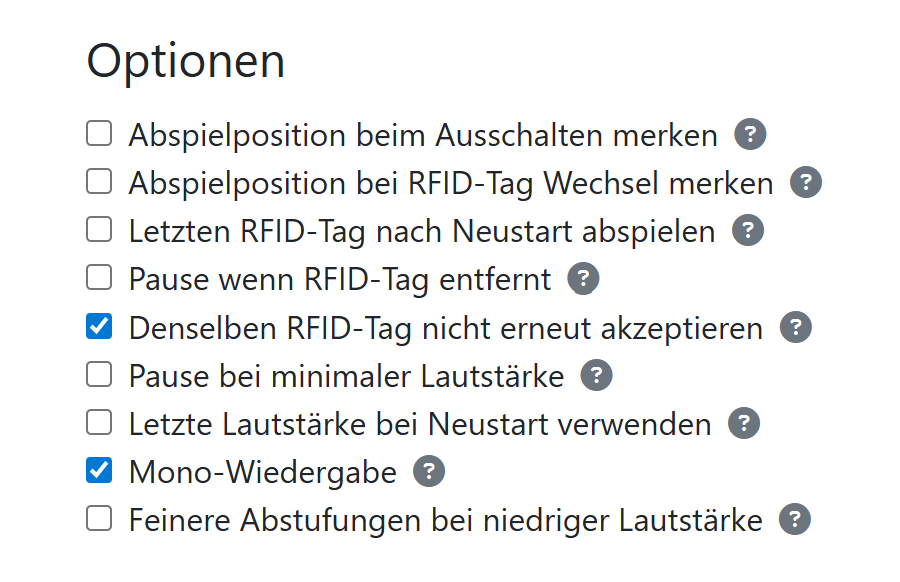
Genau, die Optionen hab ich gefunden. Das ändert aber nichts daran das die Karte immer wieder erkannt wird obwohl Sie unbewegt und richtig positionier auf dem Reader liegt. Wenn ich PAUSE_WHEN_RFID_REMOVED aktiviere wird der Track immer wieder unterbrochen und resumed (siehe log) obwohl die karte unbewegt auf dem Reader liegt.
Das Feature hat schon immer Probleme gemacht und ich denke der Tag wird kommen, an dem ich es einfach aus dem Code werfe. Ich hab’s schon nie für eine gute Idee gehalten, es überhaupt zu haben - hab’s aber dummerweise implementiert, nachdem 1700 mal danach gefragt wurde.
Sorry für den launischen Kommentar, aber ich habe da nicht wenig Zeit investiert + auch mehrfach nachjustiert. Aber es zeigt sich einfach, dass das ordentliche Funktionieren offenbar vom jeweiligen Gehäuse abhängt (Abstand zum Reader, Material, Metall in der Nähe). Wahrscheinlich auch von den Karten und von den Readern, die in der Qualität gerne mal streuen.
Insofern: Wenn ihr das besser haben wollt, dann müsst ihr es verbessern. Man kann mit den Timings bisschen experimentieren, allerdings führt übermäßiges Verlängern dazu, dass das System auch träger reagiert. Wenn du nach lastTimeDetected14443 hier im Forum suchst, findest du auch Diskussionen zu dem Thema.
Die von mir vorgeschlagene Benutzung ist:
- Karte aus dem „Sammelalbum“ holen
- Karte auflegen kurz auflegen und wieder entfernen
- Karte wieder in’s Sammelalbum stecken
Dann fliegt auch nix rum  .
.
Ich hab die timings auf 1000ms erhöht und hab seitdem keine Pausen mehr erlebt. Das einzige was dann noch auftritt ist, dass er nachdem eine Playlist zu Ende ist es nach ein paar Minuten wieder von vorne anfängt, weil er es als neu aufgelegt erkennt.
Das Feature ist halt das, was es am nächsten ans kommerzielle Produkt heranbringt, drum wünschen sich die Leute das. Thema Wiedererkennung und Akzeptanz.
Beim neuen Prototypen für die Complete ist mir aufgefallen, dass der Reader einen input für 5V hat. Ist der mit den dreieinhalb (ungerade) Volt evtl unterversorgt und deshalb bei Dauererkennung unzuverlässig? Ist ne naive Frage weil ich von Hardware wenig Ahnung hab 
Verstehen tue ich das schon, aber die (Produzenten) haben halt den Vorteil, dass deren Gehäuse und die Hardware immer gleich ist. Bei Tonuino gibt’s dieses Feature auch, die benutzen es aber nur für RC522.
Das Thema mit den 5 V haben wir hier auch schon öfter diskutiert. Fakt ist, dass wir diese 5 V im Akkubetrieb nicht haben und ich extra dafür einen Schaltregler auf der Complete hinzufügen müsste. Das hatte ich beim Design der Complete hier auch zur Disposition gestellt. Mit dem Ergebnis, dass es eher nicht notwendig sei.
Die 5 V hatten wir aber glaube ich vor dem Hintergrund der Reichweite und der Streuung der PN5180 diskutiert. Ob die 5 V tatsächlich einen Vorteil haben, könnte ja mal wer ausprobieren: Die Anschlussleitung für 5 V vom Reader ablöten (und isolieren, damit es keinen Kurzschluss gibt) und dafür eine eindrähtige Verbindungsleitung von VUSB (siehe Bild) zu eben diesen 5 V herstellen. Dann ESPuino im USB-Modus betreiben (wichtig!).
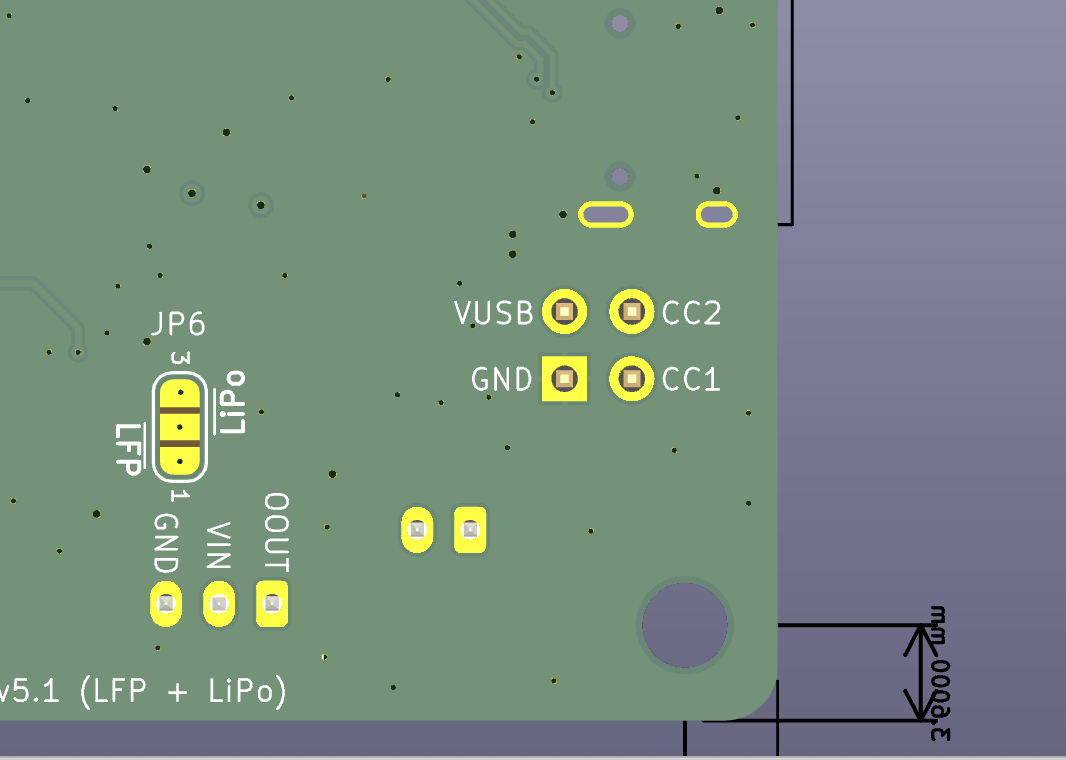
Soweit ich weiß hat’s dazu auch schon Tests gegeben, aber ich weiß das Ergebnis nicht mehr. Ist hier im Forum aber alles dokumentiert. Es gibt zur Not auch Breadboards mit Schaltreglern, die 5 V liefern. Damit könnte man sich nachträglich auch eine 5 V-Versorgung im Akkubetrieb „dranbasteln“.
Übrigens sei als Lösung des eigentlichen Problems, über das wir hier diskutieren, das hier noch erwähnt: Magnetische Hockey Tags.
Wollte jetzt keine Grundsatzdebatte über das Feature anzetteln. Habe nur mal mit den Einstellungen experimentiert. Ich kann mir nicht vorstellen, dass 5 V bei mir die Lösung wären.
Eine normale Karte wird auf ca. 5 cm erkannt und ein Chip auf etwa 2 cm. Die Performance ist also mehr als ausreichend. Man bräuchte ja auch eine qualitativ gute 5‑V‑Versorgung für die Antenne; ein einfacher China‑Step‑Up wird die Performance nicht verbessern.
lastTimeDetected14443 – ich werde den Wert mal erhöhen, wenn ich Zeit habe. Ich habe die Toolchain noch nicht eingerichtet.
Ich habe folgendes Gehäuse, also nichts Außergewöhnliches.
Hallo zusammen,
dieses Verhalten hatte ich auch (beim RC522) ► Empfangsprobleme mit RC522: rfidGain zu hoch?
Ich habe etwas mit der Entfernung experimentiert und festgestellt, dass es ein „zu nach“ gibt und das dieses Verhalten auslöst. Ihr könnt mal versuchen, den Abstand der Karte auf ca. 25-30mm vom Reader zu entfernen und hier ein paar Minuten liegen lassen und das Verhalten beobachten. Wenn es hier stabil läuft, scheint es auch am maximalen rfidGain zu liegen.
Mein rfidGain ist auf 1 gesetzt und läuft seit einem Monat auf vier Boxen ohne Probleme. Die RFID-Karte löst bei mir nun kein ungewünschtes Starten oder Stoppen der Wiedergabe aus, ebenso flackert die LED-Anzeige auch nicht mehr.
Ja, ich hab’s auch schon getestet. Nicht, dass ich gerafft hätte, was da genau passiert, aber sieht sauber aus. Hab’s eben gemergt in dev.
Dabei ist mir aufgefallen, dass noch eine Behandlung fehlt.
N [1129266] Ende der Playlist erreicht.
D [1143781] PN5180 wedge/removal suspected (722 ms since last good ISO-14443 read): silent re-init
D [1144114] PN5180 silent heal gave up after 333 ms (ISO-14443 card not re-found)
N [1144114] RFID-Karte wurde entfernt
N [1144116] Playmode kann nicht verändert werden, wenn keine Playlist aktiv ist.
Liegt die Karte bis zum Ende auf und wird dann entfernt, dann löst das eine Fehlermeldung aus. Das fixe ich gleich noch.
@sadilek Was hast du da als Grundlage genommen, dass der Fix rauskam? Der andere PR für den RC522? Oder ist Fable halt einfach viel schlauer als Sonnet und daher bin ich in der letzten Iteration auf keine bessere Lösung gekommen?
Das kann ich ehrlich gesagt nur mutmaßen. Dass der Fehler zumindest bei mir nach deinem Fix-Versuch noch auftrat, lässt mich vermuten, dass bei dir die Feedback-Schleife gefehlt hat. Ich konnte den Fehler zuverlässig reproduzieren und habe Claude die Logs zur Verfügung gestellt. Es hat dann 4 Iterationen gebraucht, bis der Fehler behoben war. Die zwei Commits im PR sind erst im Nachhinein beim Aufräumen entstanden und spiegeln nicht den verworrenen Pfad der Erkenntnis wider 
Fable ist deutlich schlauer als Sonnet. Ob es mit Sonnet auch so geklappt hätte, kann ich nicht sagen. (Um die Token-Kosten im Rahmen zu halten, lasse ich Fable übrigens immer nur als Koordinator laufen. Die eigentliche Arbeit (Recherche, Coding, Review) wird an Sonnet oder Opus (in diesem Fall gewählt) delegiert.)
RC522-PR hatte ich gar nicht gesehen.
Danke für den Fix, leider tritt das Problem bei mir weiter auf. Selbst wenn ich den PN5180 Debounce auf 2000ms stelle, werden die ISO 14443 Karten in den ersten 10-30 Sekunden neu erkannt.
Mein Log sieht dann so aus (Debounce = 500):
Log
N [1558181] RFID-Karte erkannt: 33-ad-e9-1b
N [1558181] Card type: ISO-14443
I [1558184] RFID-Karte empfangen: 051173233027
E [1558189] RFID-Karte ist im NVS nicht hinterlegt.
D [1558850] PN5180 wedge/removal suspected (669 ms since last good ISO-14443 read): silent re-init
D [1559183] PN5180 silent heal gave up after 333 ms (ISO-14443 card not re-found)
N [1562536] RFID-Karte erkannt: 33-ad-e9-1b
N [1562536] Card type: ISO-14443
I [1562541] RFID-Karte empfangen: 051173233027
E [1562546] RFID-Karte ist im NVS nicht hinterlegt.
D [1563206] PN5180 wedge/removal suspected (670 ms since last good ISO-14443 read): silent re-init
D [1563541] PN5180 silent heal gave up after 335 ms (ISO-14443 card not re-found)
N [1564488] RFID-Karte erkannt: 33-ad-e9-1b
N [1564488] Card type: ISO-14443
I [1564493] RFID-Karte empfangen: 051173233027
E [1564498] RFID-Karte ist im NVS nicht hinterlegt.
D [1565688] PN5180 wedge/removal suspected (1200 ms since last good ISO-14443 read): silent re-init
D [1566425] PN5180 silent heal gave up after 737 ms (ISO-14443 card not re-found)
N [1567038] RFID-Karte erkannt: 33-ad-e9-1b
N [1567038] Card type: ISO-14443
I [1567044] RFID-Karte empfangen: 051173233027
E [1567049] RFID-Karte ist im NVS nicht hinterlegt.
D [1568239] PN5180 wedge/removal suspected (1201 ms since last good ISO-14443 read): silent re-init
D [1568573] PN5180 silent heal gave up after 334 ms (ISO-14443 card not re-found)
N [1574850] RFID-Karte erkannt: 33-ad-e9-1b
N [1574850] Card type: ISO-14443
I [1574852] RFID-Karte empfangen: 051173233027
E [1574858] RFID-Karte ist im NVS nicht hinterlegt.
D [1576049] PN5180 wedge/removal suspected (1199 ms since last good ISO-14443 read): silent re-init
D [1576382] PN5180 silent heal gave up after 333 ms (ISO-14443 card not re-found)
Naja, mit der Option „Denselben RFID-Tag nicht erneut akzeptieren“ klappts ja trotzdem wunderbar.